Meta Integration
Connect your salon's Instagram and Facebook accounts to display live video reels on your storefront hero section
Instagram & Facebook Reels Integration
NxCut lets you connect your salon's Instagram and Facebook accounts with 1 click directly from your Theme Settings. Once connected, your latest video reels automatically sync and display in the hero section of your salon website.
What this does for your salon
- Showcase your work live: Automatically display your newest hair, nail, or beauty reels on your website homepage.
- 1-Click Connection: Log in with your Instagram or Facebook account — no technical setup or coding required.
- In-App Live Preview: Watch and test your live reels directly inside Theme Settings before publishing.
- Always Up to Date: Your website refreshes with your latest posts automatically.
How to access the integration
Locate Social Media
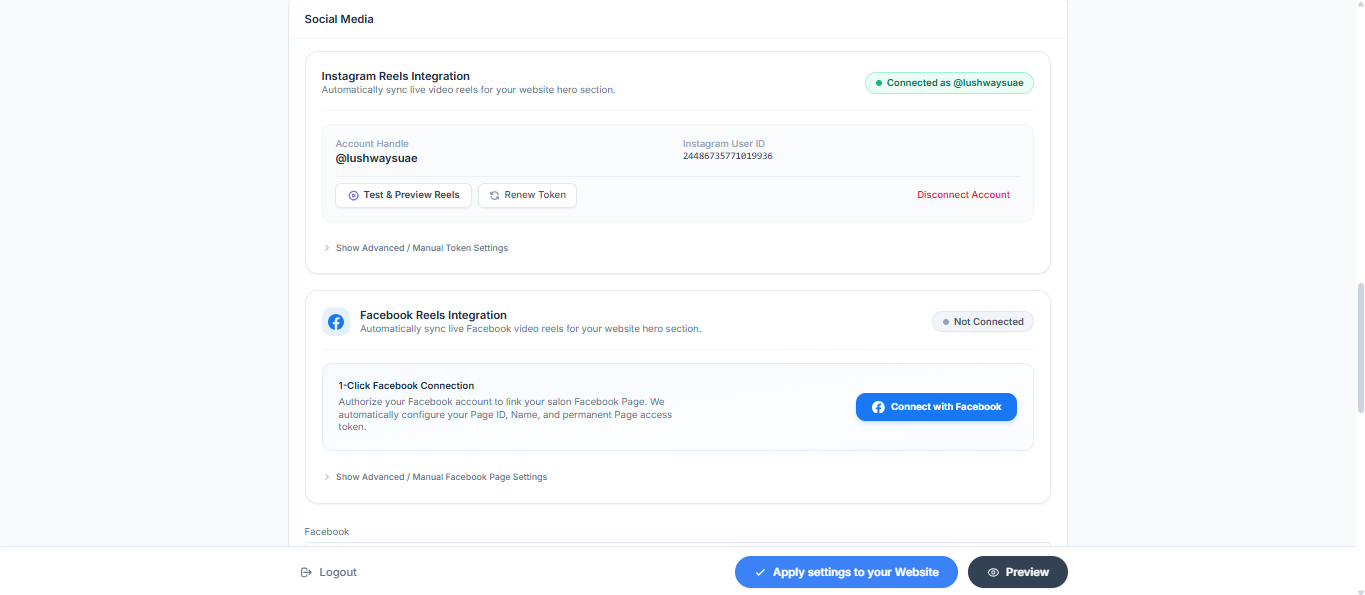
Scroll down the page until you see the Social Media section. You will see cards for Instagram Reels Integration and Facebook Reels Integration.
Connecting your Instagram account
Click "Connect with Instagram"
In the Instagram Reels Integration card, click the gradient Connect with Instagram button.
Authorize permissions
You will be redirected to Instagram / Meta. Log in to your salon's Instagram account and grant permission for NxCut to view your profile and media.
Confirmation
After authorizing, you will be redirected back to Theme Settings automatically:
- The status badge changes from gray to green:
Connected as @your_handle. - Your Account Handle and Instagram User ID are saved.
Test & Preview
Click the Test & Preview Reels button to view your live 9:16 reels feed right on the screen.
Connecting your Facebook Page
Click "Connect with Facebook"
In the Facebook Reels Integration card, click the blue Connect with Facebook button.
Select your Facebook Page
Log in to your Facebook account and select the business page representing your salon.
Grant permissions
Approve the requested page permissions so NxCut can fetch your published video reels.
Confirmation & Preview
You will be returned to Theme Settings:
- The status badge turns green:
Connected as [Your Page Name]. - Click Test & Preview Facebook Reels to verify your video feed.
Managing your connections
Both Instagram and Facebook cards offer simple self-service buttons:
| Button | What it does | When to use it |
|---|---|---|
| Test & Preview Reels | Opens a live preview showing your 9:16 video reels with captions. | Anytime you want to confirm that new videos are syncing properly. |
| Renew Token | Refreshes the secure connection with Meta for another 60 days. | Whenever you want to extend your connection without reconnecting from scratch. |
| Disconnect Account | Unlinks your account and reverts your website hero to default reels. | When you want to disconnect or switch to a different social account. |
| Show Advanced Settings | Opens an accordion to view or manually update account details. | Only if directed by your salon administrator or support team. |
Frequently Asked Questions & Troubleshooting
Why does the preview show 0 reels?
Make sure your Instagram or Facebook account has published video reels. The feed specifically displays video posts. If your account only has static image photos, no reels will appear.
How do I know my account is successfully connected?
Look at the status badge at the top right of each card:
- Green badge:
Connected as @your_handleorConnected as [Page Name]— your account is active and syncing. - Gray badge:
Not Connected— click the connect button to link your account.
How long does the connection last?
Meta access tokens are valid for 60 days. To keep your video feed running continuously:
- Click the Renew Token button in Theme Settings anytime.
- Or simply click Connect with Instagram / Connect with Facebook again to renew the connection.
How do I switch to a different account or page?
- Click the red Disconnect Account link on the active card.
- Click Connect with Instagram or Connect with Facebook again.
- Select your new account or page during the login prompt.